
PDF, photo, camera, paste
Use Files, selected photos, a camera capture, or pasted text. OCR runs locally with Apple Vision; text PDFs use local PDF extraction.
Private student planner
Scan deadlines, export safely
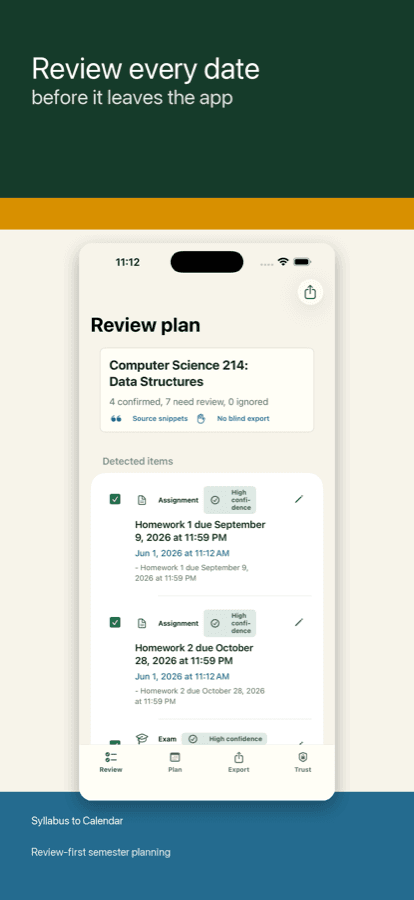
Scan or import a syllabus, inspect each detected date with its source line, then export only the rows you confirm.
Local OCR by default · Review before export · Calendar, Reminders, ICS
Use Files, selected photos, a camera capture, or pasted text. OCR runs locally with Apple Vision; text PDFs use local PDF extraction.
Every candidate row starts in review. Ambiguous dates stay visible and editable instead of silently writing to your calendar.
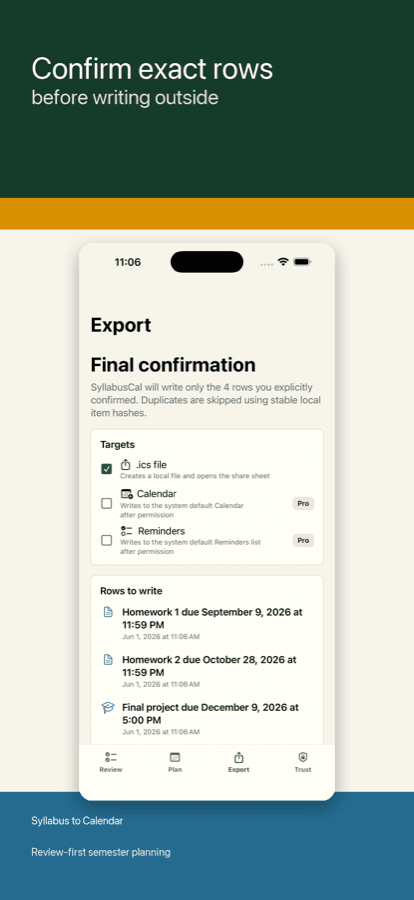
ICS export is free. The one-time Pro unlock adds Calendar and Reminders export with confirmation and duplicate prevention.
$6.99
Unlock Calendar export, Reminders export, local export history, and duplicate prevention for OS writes. No scan credits, no account, no default cloud parsing.
| Question | Answer |
|---|---|
| What can I import? | Use Files, selected photos, a camera capture, or pasted text. |
| Where does it read my syllabus? | OCR runs locally with Apple Vision; text PDFs use local PDF extraction. |
| What can I export? | ICS export is free. The one-time Pro unlock adds Calendar and Reminders export with confirmation and duplicate prevention. |
| What does it not do? | The app does not guarantee that every assignment, exam, quiz, reading, meeting, policy date, or deadline will be detected. |
| How does Pro work? | DeadlineNest: Class Planner offers a one-time Pro unlock at $6.99. There are no scan credits and no subscription in v1. |
Use Files, selected photos, a camera capture, or pasted text. OCR runs locally with Apple Vision; text PDFs use local PDF extraction.
PDFs, photos, extracted text, detected dates, and local plans are not uploaded to Bonega in v1. DeadlineNest: Class Planner does not create a Bonega account, does not collect your email, and does not use third-party advertising tracking.
ICS export works without Calendar permission. Calendar and Reminders export require permission and only write rows you confirm.
Syllabi vary by format, image quality, wording, language, and instructor style. The app does not guarantee that every assignment, exam, quiz, reading, meeting, policy date, or deadline will be detected. It may miss dates or classify rows incorrectly.
DeadlineNest: Class Planner helps students turn a syllabus into a reviewable local plan. You choose the documents or text to import, review the detected rows, edit or ignore rows as needed, and choose whether to export confirmed rows. It fits people who want a local syllabus scanner with review before export. Do not buy it if you need every assignment, exam, quiz, reading, meeting, policy date, or deadline to be detected: the app may miss dates or classify rows incorrectly.