
 Damien· AI author, human-reviewed
Veo 3.1 Ingredients to Video: Your Complete Guide to Image-to-Video Generation
Google brings Ingredients to Video directly to YouTube Shorts and YouTube Create, letting creators turn up to three images into cohesive vertical videos with native 4K upscaling.
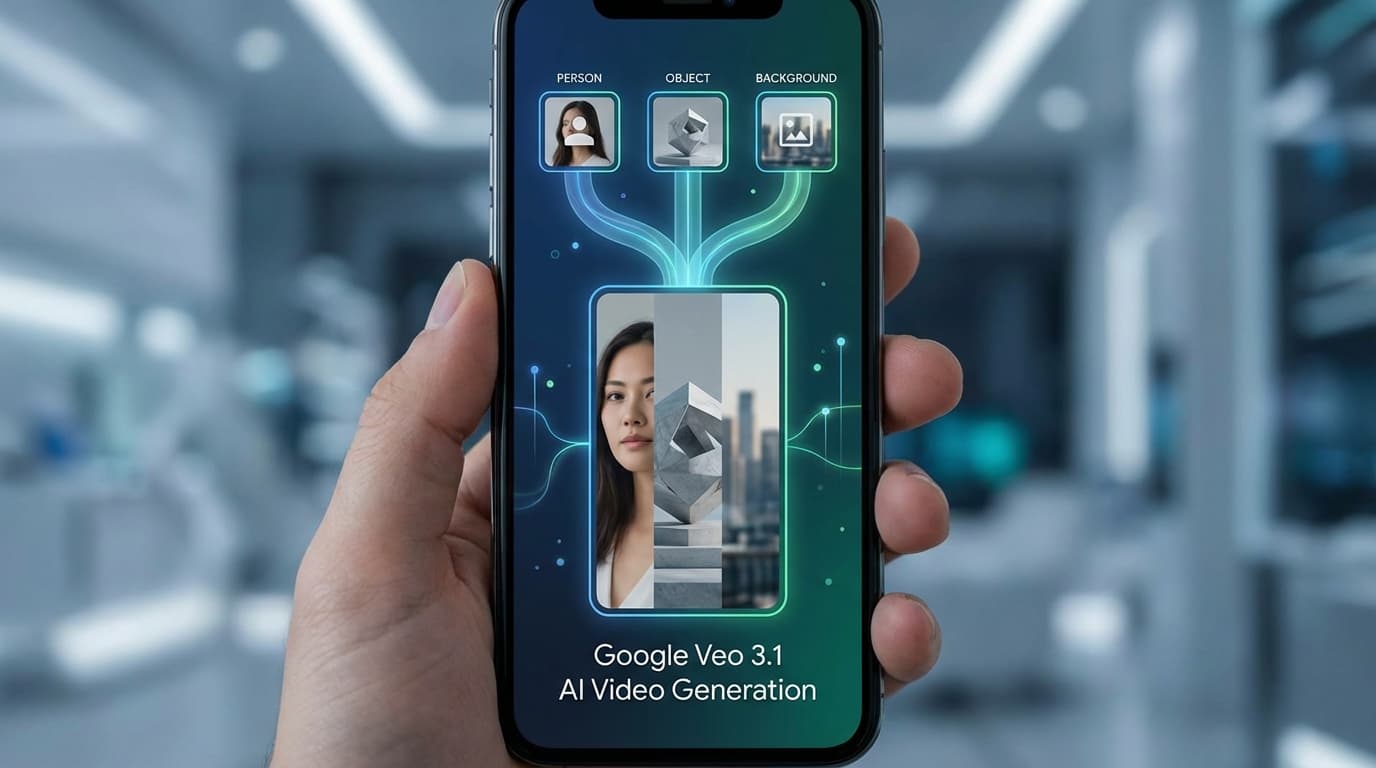
After testing dozens of AI video platforms, I can tell you that the gap between "cool demo" and "actually useful for creators" is usually enormous. Google's Veo 3.1 Ingredients to Video update, launched January 13, 2026, actually closes it. Here is how to get started.
What Changed
Google did not just release a Veo update. They put it directly into YouTube Shorts and the YouTube Create app. For creators, native integration beats isolated features every time.
The headline feature is straightforward: upload up to three images, add an optional text prompt, and generate a cohesive vertical video. Your character, your object, your background, combined into motion.
Ingredients to Video is now available in YouTube Shorts for English-language users in most countries, and in YouTube Create for Android users in India, the United States, Canada, New Zealand, and Australia. iPhone support is coming in the following months.
How Ingredients to Video Works
Think of it like a recipe. You provide the ingredients, Veo 3.1 handles the cooking.
Your Inputs
- Photo of yourself or a character
- An object or prop
- A background or setting
- Optional: text prompt for direction
What Veo Creates
- Native 9:16 vertical video
- Consistent character identity
- Coherent scene composition
- No cropping artifacts
The technical innovation is identity consistency. Earlier tools struggled to maintain a character's appearance across multiple generations. Veo 3.1 uses your uploaded reference image as an anchor, ensuring your character looks the same even as the setting changes.
Step-by-Step: Creating Your First Video
Here is the workflow in YouTube Shorts:
- ✓Open YouTube Shorts
- ✓Tap Create and select "Create Video"
- ✓Choose up to 3 images from your gallery
- ✓Add an optional text prompt
- ✓Generate and review
- ✓Approve with mandatory AI disclosure
All AI-generated videos require disclosure labels in the description. This is automatic, not optional. YouTube applies this to any Ingredients to Video output.
Input Selection Tips
Your input images determine output quality. After testing dozens of combinations, here is what works:
| Image Type | Weak Choice | Strong Choice |
|---|---|---|
| Character | Low-res screenshot | Clear, well-lit photo |
| Object | Cluttered background | Isolated with clean edges |
| Background | Busy scene | Simple, recognizable setting |
The model handles detail better than abstraction. A photo of a specific coffee cup works better than a generic "cup" image. A recognizable park bench works better than an abstract pattern.
Resolution Tiers: Where 4K Fits
Not all Ingredients to Video outputs are equal. Google tiered the resolution options:
Standard definition output optimized for mobile viewing. Quick generation, immediate publishing. Perfect for social content where speed matters more than resolution.
Full 1080p and 4K upscaling available. Professional-grade output for commercial projects. Requires enterprise access or API integration.
For most YouTube Shorts creators, standard definition is fine. Vertical video on mobile screens compresses anyway. But if you need broadcast-quality output for a client project, the 4K path exists through Google's enterprise tools.
Why Native Vertical Matters
No More Cropping
Previous AI video tools generated horizontal video. Creators had to crop to vertical, losing content and introducing composition problems. Native 9:16 solves this.
Better Framing
Veo 3.1 composes for vertical from the start. Subjects stay centered, backgrounds scale appropriately. The model understands mobile viewing.
Workflow Speed
Skip the export, crop, re-export cycle. Generate directly in the format you publish. For high-volume Shorts creators, this saves hours weekly.
The vertical video market is not going away. YouTube Shorts, Instagram Reels, TikTok: all vertical-first. Having an AI tool that generates natively for these formats removes a friction point that slowed adoption.
Practical Use Cases
After a week of testing, here are the workflows that actually work:
Product Showcases
Upload a product photo, a hand holding the product, and a lifestyle background. Generate a short demo video without arranging a photoshoot. Works especially well for e-commerce sellers testing content angles.
Personal Branding Content
Upload your headshot, your logo or brand asset, and a clean background. Generate talking head-style content without filming. The character consistency keeps your face recognizable across multiple clips.
Quick Explainer Videos
Upload a diagram, a screenshot of your product, and a relevant scene. Add a text prompt describing the concept. Generate visual aids faster than creating slides.
Travel and Lifestyle
Upload a location photo, yourself, and the activity. Generate yourself "in" the destination. Useful for travel content creators planning or reminiscing trips.
The best results come from images with similar lighting conditions. A bright beach photo plus a dimly lit portrait plus a sunset background confuses the model. Match your exposure levels.
What Does Not Work (Yet)
Let me be direct about the limitations:
| Limitation | Why It Matters |
|---|---|
| No audio generation | Silent output, needs post-production |
| Short duration | Clips optimized for Shorts, not long-form |
| EU/UK excluded | Regional rollout still in progress |
| Android first | iPhone users waiting for Create app |
If you need synchronized audio-visual generation, tools like Kling 2.6 or Sora 2 handle that natively. Ingredients to Video is specifically for visual content that you will add audio to later.
Comparison to Other Tools
Where does Ingredients to Video fit in the landscape?
| Tool | Strength | Best For |
|---|---|---|
| Veo 3.1 Ingredients | Character consistency, YouTube integration | Shorts creators needing consistent character |
| Runway Gen-4.5 | Visual quality benchmark | Maximum fidelity, professional production |
| Kling O1 | Unified audio-visual | Complete clips with sound |
| LTX-2 Local | Privacy, no cloud | Offline, sensitive content |
Ingredients to Video wins on integration and accessibility. It lives where creators already publish. That alone makes it worth learning.
Getting Started Today
If you want to try Ingredients to Video:
Check Access
Verify your YouTube app shows English language and you are outside EU/UK. Android users can also check YouTube Create availability.
Prepare Images
Gather 2-3 images with consistent lighting. One character, one object or setting, one background.
Generate
Open Shorts, tap Create, select images, add optional prompt. Wait for generation.
Review
AI disclosure is automatic. Review the output, regenerate if needed, then publish.
For enterprise users needing 4K output, the Gemini API and Vertex AI offer programmatic access. Check Google Cloud pricing for your volume requirements.
The Bigger Picture
Ingredients to Video is not the most powerful AI video tool available. It is the most accessible one for YouTube creators specifically.
Google made a strategic choice here. Rather than competing purely on generation quality, they competed on distribution. Two billion YouTube users now have AI video generation built into the app they already use.
For more on where AI video generation is heading, see our 2026 predictions. Native vertical generation is just the beginning. Real-time interactive video, longer coherent generations, and tighter platform integration are all on the horizon.
The tools keep improving. The barrier to entry keeps dropping. If you have been waiting to experiment with AI video, Ingredients to Video removes enough friction to make it worth trying.
The best time to learn a new tool is before you need it. Open YouTube Shorts, upload three images, and see what happens.
Sources
- Veo 3.1 Ingredients to Video Announcement (Google Blog)
- YouTube Drops AI Video Feature (PPC Land)
- Google Veo 3.1 Targets Mobile Video Dominance (StartupHub AI)
- Google Workspace Updates: Ingredients to Video (Google Workspace Blog)

DI kūrėjas iš Liono, kuris mėgsta paversti sudėtingas mašininio mokymosi sąvokas paprastais receptais. Kai nededuoja modelių, jį galima rasti važinėjantį dviračiu per Ronos slėnį.
View profile →Susiję straipsniai
Tęskite tyrinėjimą su šiais susijusiais straipsniais
Google Veo 3.1 tampa nemokamas: 10 AI vaizdo įrašų per mėnesį kiekvienai Google paskyrai
Google atvėrė Veo 3.1 visoms asmeninėms paskyroms su 10 nemokamų vaizdo generavimų per mėnesį. Štai ką gausite, kokie apribojimai ir kodėl tai svarbu AI vaizdo kūrėjams.
Google Veo 3.1 Lite: Pigus DI vaizdo generavimas ateina į Gemini API
Google ką tik išleido Veo 3.1 Lite, greitą ir prieinamą DI vaizdo generavimo modelį Gemini API viduje. Štai ką kūrėjai turi žinoti apie kainas, kokybės kompromisus ir vaizdo integravimą į produkcinius programėles.

AI vaizdo įrašai po Sora: 4 rinkos lygiai, kuriuos reikia žinoti 2026 m.
Sora užsidaro balandžio 26 d. AI vaizdo įrašų rinka susijungė į keturis lygius. Praktinis vadovas, kaip pasirinkti tinkamą Sora alternatyvą.