






AI 视频延长几秒内即可完成延长
用 AI 延长视频, 让任何视频更长
上传你的片段,Bonega 会从最后一帧继续场景,保持相同的动作和风格,没有可见剪切。可添加几秒或完整场景,直到视频长度完全符合你的需求。
01包含每月点数
02视频时长不受限
03HD 超清增强
04原始视频片段,无需剪辑
本页面证明的内容
- Exact billed seconds: 4.125 credits/sec for newly generated frames only
本页面未证明的内容
- Visual seam quality across extensions is not demonstrated here
- Scene continuity across consecutive extended generation blocks is not demonstrated here
- Infinite chaining without semantic drift (direction needed across long chains)
- Extension of audio tracks or voiceover (exports visual video clips only)
- Drastic genre or camera perspective jumps across extension seams
Video Extension Proof
任务相关实证Original Clip (5s)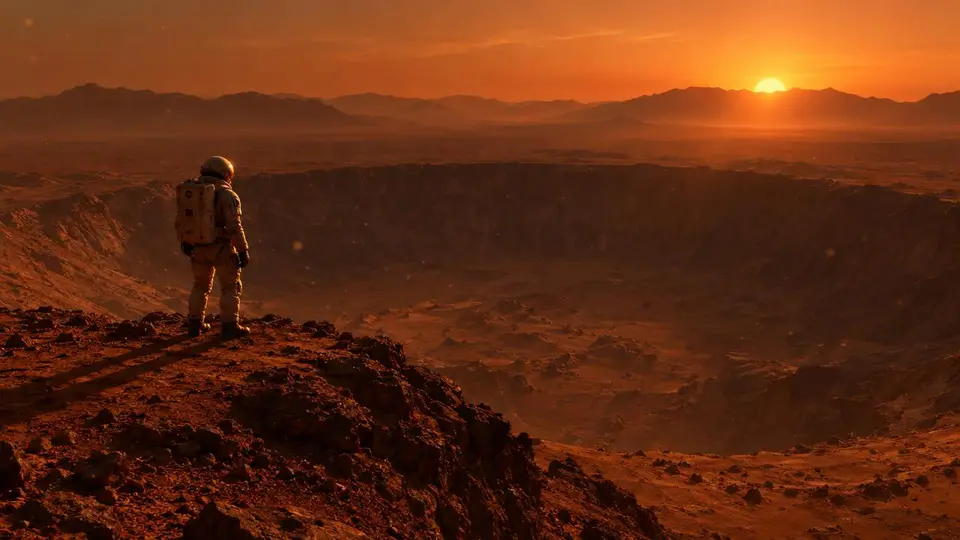
续写示例:尚未记录
时长
5 seconds original (+ extension)
成本
21 credits per 5s extension
尝试次数
not recorded
Setup Action
Load in Composer提示词
“一名孤独的宇航员站在火星巨大陨石坑边缘,尘埃颗粒漂浮在稀薄的大气中,太阳在远处山脉后落下,投下长长的橙色阴影,电影感广角镜头”
视频延长如何运作
上传片段,点击延长,下载更长的视频。三步完成,无需剪辑。
01.
延续任何片段
上传视频,AI 会从最后一帧开始延续,匹配动作、光线和风格,让延长部分看起来像一个连续镜头。
02.
总长度不限
连续延长可将 5 秒片段扩展为满足剪辑需求的长场景。每次延长都会增加几秒并消耗积分,总长度由你决定。
03.
无需剪辑
以 HD 下载完整的延长视频。无需时间线、关键帧或剪辑软件,AI 会为你完成延续。
使用 AI 延长视频:常见问题
如何用 AI 延长视频?
将片段上传到 Bonega,然后点击延长。AI 会读取最后一帧以及之前的运动轨迹,生成与原始素材自然衔接的延续内容。下载完整、更长的视频,无需剪辑软件。
AI 能在不损失质量的情况下让视频变长吗?
可以。Bonega 会匹配原始片段的动作、光线和风格,使延长部分自然融合、没有可见剪切;最终导出还包含 HD 超分辨率。
我的视频最多可以延长多久?
没有硬性限制。每次延长都会增加数秒,你可以连续多次延长,5 秒片段可以变成 30 秒、1 分钟或更长。每次延长都会消耗积分,因此费用由你掌控。
我可以延长用其他 AI 工具制作的视频吗?
可以。上传任意视频文件,无论是来自 Sora 或其他生成器的片段、手机拍摄的视频还是素材视频,Bonega 都会以相同方式继续生成。
如何为 TikTok 或 YouTube 制作更长的视频?
在 Bonega 中延长片段,直到达到所需长度,然后下载并发布。支持竖屏和横屏视频,延长后会保留原始格式。
延长视频需要多少钱?
套餐起价为 $9/月,包含每月积分;今天即可开始 $0 的 3 天试用。可随时取消。
由 Bonega 创作
真实的 AI 生成视频片段。悬停即可查看提示词。
从提示到导出,仅需 4 步
使用流程
描述您的场景
选择时长
自由延长
导出与分享
01
02
03
04
01
描述您的场景
02
选择时长
03
自由延长
04
