






AI 影片延長工具數秒內完成延長
使用 AI 延長影片, 讓任何影片更長
上傳您的片段,Bonega 會從最後一格畫面延續場景,保留相同動作、相同風格,沒有明顯剪接痕跡。無論要增加幾秒或延長整個場景,都能讓影片精準符合您所需的長度。
01含每月點數
02影片時長不受限
03HD 升級
04原生影片片段,無需剪輯
此頁面證明的內容
- Exact billed seconds: 4.125 credits/sec for newly generated frames only
此頁面未證明的內容
- Visual seam quality across extensions is not demonstrated here
- Scene continuity across consecutive extended generation blocks is not demonstrated here
- Infinite chaining without semantic drift (direction needed across long chains)
- Extension of audio tracks or voiceover (exports visual video clips only)
- Drastic genre or camera perspective jumps across extension seams
Video Extension Proof
任務關聯證明Original Clip (5s)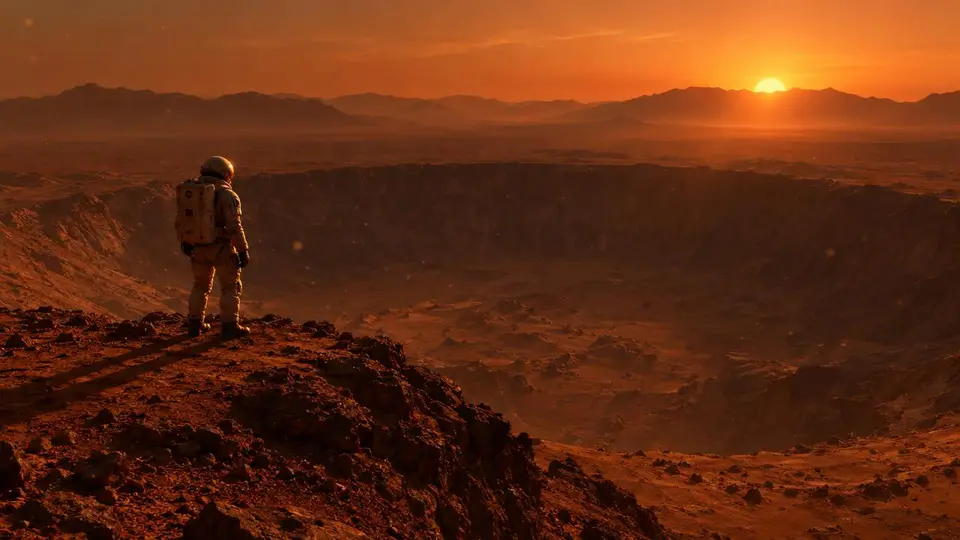
接續範例:尚未記錄
時長
5 seconds original (+ extension)
費用
21 credits per 5s extension
嘗試次數
not recorded
Setup Action
Load in Composer提示詞
“一名孤獨太空人站在火星巨大隕石坑邊緣,塵埃顆粒漂浮於稀薄大氣中,太陽在遠方山脈後落下,投射出長長的橘色陰影,電影感廣角鏡頭”
影片延長的運作方式
上傳片段、按下延長、下載更長的影片。三個步驟,零剪輯。
01.
延續任何片段
上傳影片後,AI 會從最後一格畫面接續,配合動作、光線與風格,讓延長後的影片看起來像一鏡到底。
02.
總長度無上限
串接多次延長,將 5 秒片段擴展成符合剪輯需求的長度。每次延長都會增加數秒並使用點數,總長度由您決定。
03.
無須剪輯
以 HD 下載完整的延長影片。不需要時間軸、關鍵影格或剪輯軟體,AI 會為您完成延續。

使用 AI 延長影片 FAQ
如何使用 AI 延長影片?
將您的片段上傳至 Bonega 並按下延長。AI 會讀取最後一格畫面及其前的動作,接著生成能自然銜接原始素材的延續內容。您可下載完整且更長的影片,無須剪輯軟體。
AI 可以在不降低品質的情況下讓影片更長嗎?
可以。Bonega 會配合原始片段的動作、光線與風格,讓延長內容自然融合且沒有明顯剪接痕跡,最終匯出也包含 HD 升頻。
我的影片最多可以延長多少?
沒有硬性限制。每次延長可增加數秒,您可以連續串接延長,5 秒片段可以變成 30 秒、1 分鐘或更長。每次延長都會使用點數,因此費用由您掌控。
我可以延長使用其他 AI 工具製作的影片嗎?
可以。上傳任何影片檔案,無論是來自 Sora 或其他生成工具的片段、手機拍攝影片或素材影片,Bonega 都會以相同方式延續。
如何讓 TikTok 或 YouTube 影片變得更長?
在 Bonega 中延長片段至您想要的長度,再下載並發佈。系統同時支援直式與橫式影片,延長後會保留原始格式。
延長影片的費用是多少?
方案每月 $9 起,包含每月點數,今日即可開始 3 天 $0 試用。可隨時取消。
由 Bonega 製作
真實的 AI 生成影片片段。滑鼠懸停即可查看提示詞。
從提示詞到匯出,僅需 4 個步驟
運作方式
描述您的場景
選擇時長
自由延長
匯出與分享
01
02
03
04
01
描述您的場景
02
選擇時長
03
自由延長
04
