








ขยายวิดีโอด้วย AI, ทำให้วิดีโอใดก็ยาวขึ้น
อัปโหลดคลิปของคุณ แล้ว Bonega จะต่อฉากจากเฟรมสุดท้ายให้ ทั้งการเคลื่อนไหวและสไตล์เดิม โดยไม่มีรอยตัดที่มองเห็นได้ เพิ่มได้ทั้งไม่กี่วินาทีหรือทั้งฉาก จนวิดีโอมีความยาวตามที่คุณต้องการ
สิ่งที่หน้านี้พิสูจน์ให้เห็น
- Exact billed seconds: 4.125 credits/sec for newly generated frames only
สิ่งที่หน้านี้ไม่ได้พิสูจน์
- Visual seam quality across extensions is not demonstrated here
- Scene continuity across consecutive extended generation blocks is not demonstrated here
- Infinite chaining without semantic drift (direction needed across long chains)
- Extension of audio tracks or voiceover (exports visual video clips only)
- Drastic genre or camera perspective jumps across extension seams
Video Extension Proof
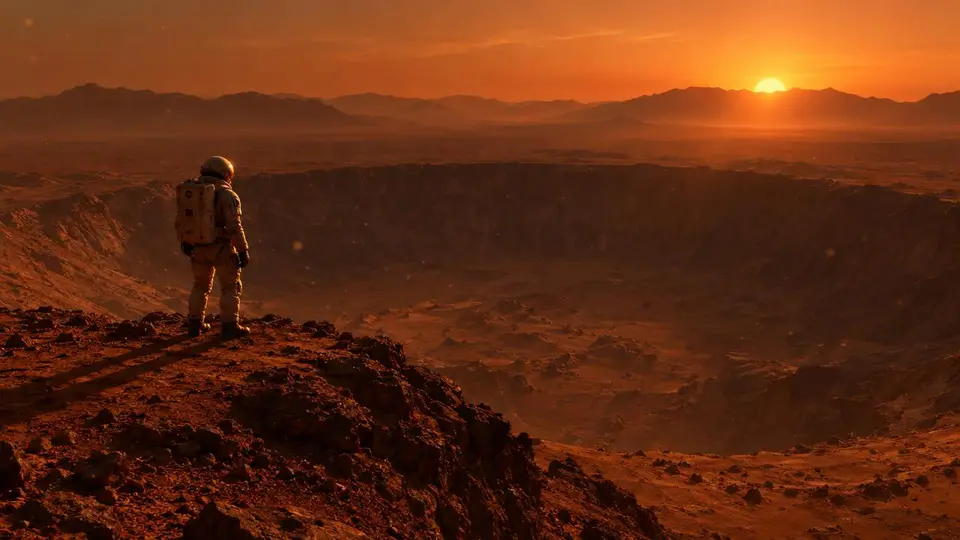
“นักบินอวกาศผู้โดดเดี่ยวยืนอยู่ริมปล่องภูเขาไฟขนาดใหญ่บนดาวอังคาร อนุภาคฝุ่นลอยอยู่ในบรรยากาศเบาบาง ดวงอาทิตย์ตกหลังภูเขาที่อยู่ไกลออกไปทอดเงาสีส้มยาว มุมกว้างแบบภาพยนตร์”
การขยายวิดีโอทำงานอย่างไร
อัปโหลดคลิป กดขยาย แล้วดาวน์โหลดวิดีโอที่ยาวขึ้น 3 ขั้นตอน โดยไม่ต้องตัดต่อ
ต่อคลิปใดก็ได้
อัปโหลดวิดีโอ แล้ว AI จะต่อจากเฟรมสุดท้าย โดยจับคู่การเคลื่อนไหว แสง และสไตล์ เพื่อให้ส่วนที่ขยายดูเป็นช็อตต่อเนื่องเดียวกัน
ไม่มีขีดจำกัดความยาวรวม
ต่อส่วนขยายหลายครั้งเพื่อเปลี่ยนคลิป 5 วินาทีให้เป็นฉากยาวเท่าที่งานตัดต่อของคุณต้องการ แต่ละส่วนขยายเพิ่มเวลาไม่กี่วินาทีและใช้เครดิต ดังนั้นคุณเลือกความยาวรวมได้เอง
ไม่ต้องตัดต่อ
ดาวน์โหลดวิดีโอฉบับขยายเต็มความยาวใน HD ไม่ต้องใช้ไทม์ไลน์ คีย์เฟรม หรือซอฟต์แวร์ตัดต่อ เพราะ AI จะต่อเนื้อหาให้คุณ
ก่อนและหลัง
คลิปต้นฉบับของคุณหยุดลง แต่ Bonega ทำให้ฉากดำเนินต่อไป
คำถามที่พบบ่อยเกี่ยวกับการขยายวิดีโอด้วย AI
ฉันจะขยายวิดีโอด้วย AI ได้อย่างไร?
AI ทำให้วิดีโอยาวขึ้นโดยไม่เสียคุณภาพได้ไหม?
ฉันทำให้วิดีโอยาวขึ้นได้มากแค่ไหน?
ฉันขยายวิดีโอที่สร้างด้วยเครื่องมือ AI อื่นได้ไหม?
ฉันจะทำให้วิดีโอยาวขึ้นสำหรับ TikTok หรือ YouTube ได้อย่างไร?
การขยายวิดีโอมีค่าใช้จ่ายเท่าไร?
วิดีโอของคุณ ยาวได้ตามที่ต้องการ
เริ่มทดลองใช้ 3 วันในราคา $0 วันนี้ แพ็กเกจเริ่มต้นที่ $9/เดือน ยกเลิกได้ทุกเมื่อ
ขยายวิดีโอของฉันสร้างด้วย Bonega
คลิปวิดีโอจริงที่สร้างโดย AI เลื่อนเมาส์ไปวางเพื่อดู prompt
จากพรอมต์สู่การส่งออกใน 4 ขั้นตอน
วิธีการทำงาน
อธิบายฉากของคุณ
เลือกความยาว
ขยายได้อย่างอิสระ
ส่งออกและแชร์
อธิบายฉากของคุณ
เลือกความยาว
ขยายได้อย่างอิสระ
ส่งออกและแชร์

เริ่มด้วยการทดลองใช้ฟรี 3 วัน
เริ่มใช้งานฟรี อัปเกรดเมื่อต้องการเพิ่ม และยกเลิกได้ทุกเมื่อ
มาตรฐาน
ทดลองใช้ฟรี 3 วัน จากนั้น US$9/เดือน
≈ สูงสุด 9 วิดีโอ/เดือน
เหมาะสำหรับครีเอเตอร์
- สิทธิ์เข้าถึง Bonega pipeline
- โหมดขยาย
- ไม่มีลายน้ำ
- ลำดับความสำคัญในคิว
- รวมใบอนุญาตเชิงพาณิชย์
โปร
ทดลองใช้ฟรี 3 วัน จากนั้น US$49/เดือน
≈ สูงสุด 71 วิดีโอ/เดือน
สำหรับมืออาชีพและธุรกิจ
- สิทธิ์เข้าถึง Bonega pipeline
- โหมดขยาย
- ไม่มีลายน้ำ
- ลำดับความสำคัญสูงสุดในคิว
- รวมใบอนุญาตเชิงพาณิชย์
- การสนับสนุนแบบเร่งด่วน