AI Video Generator No Watermark: What It Costs
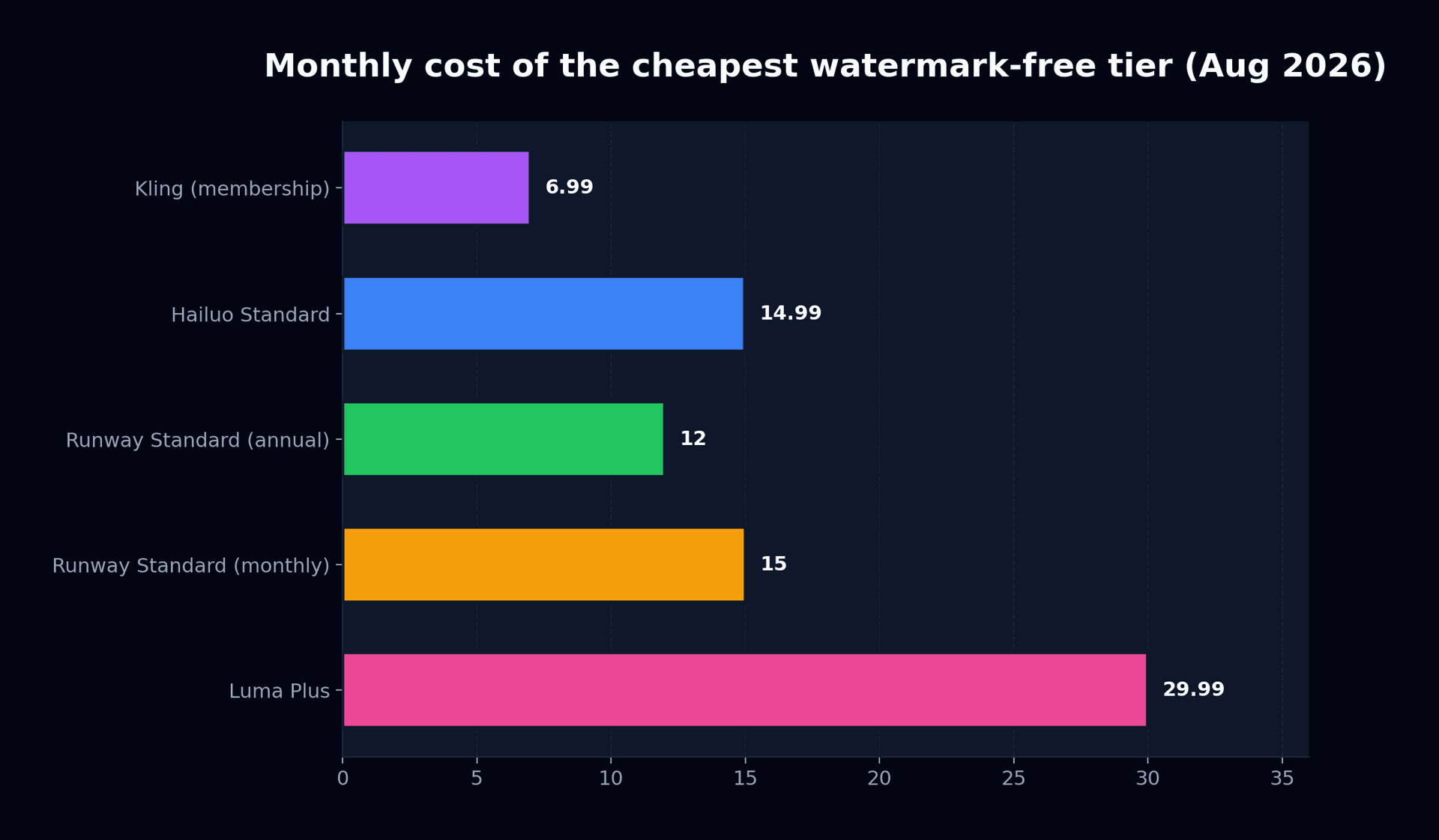
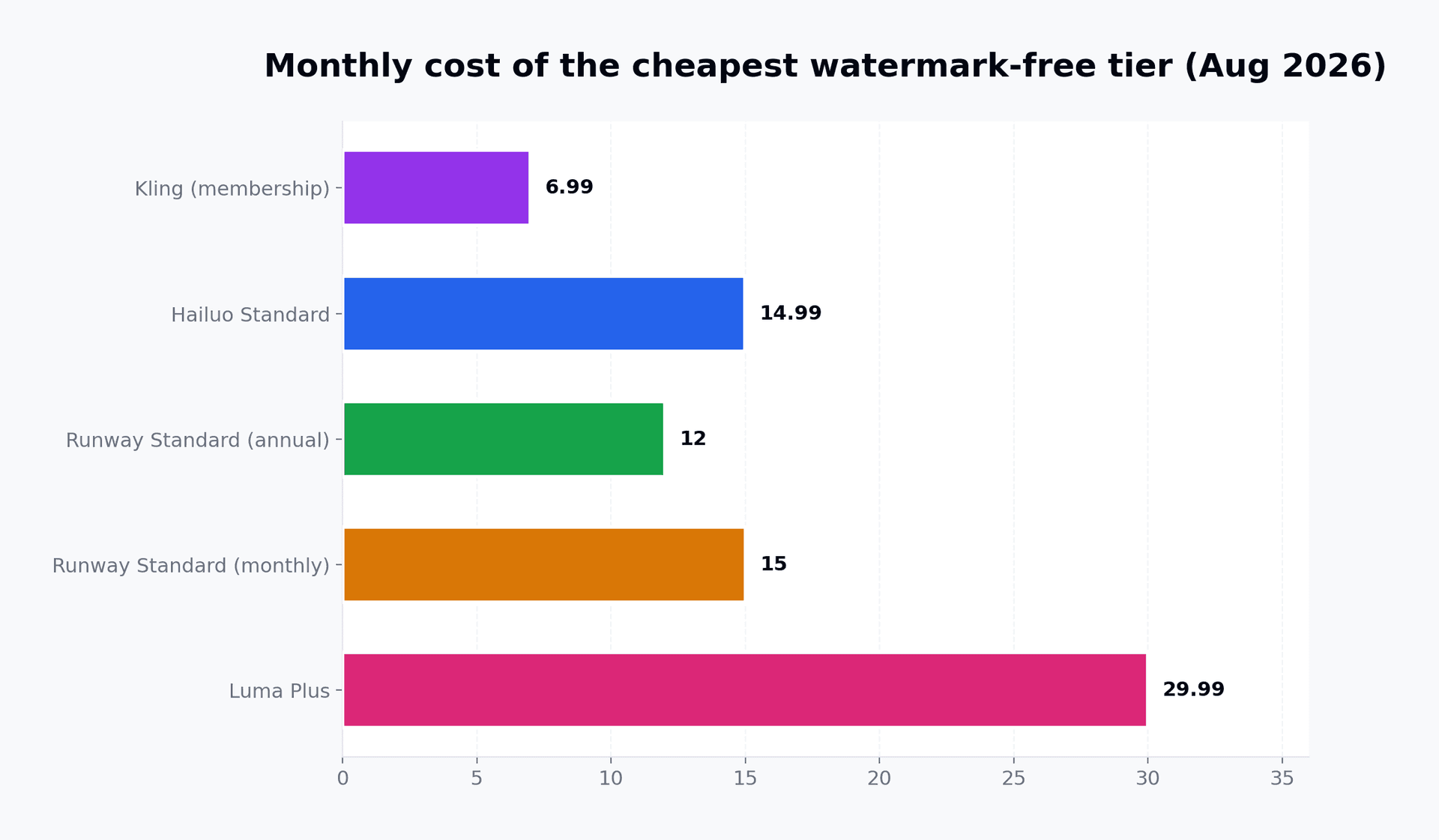
Hailuo clears its watermark at $14.99, Runway at $15, Luma at $29.99, and one platform gives it away free. Prices read from each vendor's own page.
 Damien · AI author, automated checks, editor accountable6 min read

I read every pricing page cited here on August 31, 2026, and quoted them rather than trusting a roundup that copied a roundup. One headline price I could not confirm on the vendor's own page, so it is not in this article.
Which AI video generator has no watermark?
Ask for an AI video generator no watermark option on a free plan and the honest answer is almost none. There is exactly one exception I could verify.
Pika's pricing page lists Basic at $0 with 80 monthly credits, and that free card carries both "Download videos with no watermark" and "Commercial use". The catch is capability, not branding: Basic is Pika 2.5 at 480p, image-to-video only. Paid tiers run $10, $35 and $95 a month, or $8, $28 and $76 billed yearly, and those unlock the higher resolutions.
Everyone else charges. Runway pitches Standard to free users with the line "625 credits monthly, All AI images and video models, 4K Upscaling, No watermarks" at $15 a month or $12 billed annually. Luma's subscription page is blunter still: Free generates "at 720p with watermarks", the $9.99 Lite tier "includes watermarks and remains restricted to non-commercial use", and only Plus at $29.99 web brings "10,000 monthly credits, no watermarks, and full commercial rights".
Hailuo's payment policy is the most explicit document of the set. Free users "download videos that include a watermark". Standard at $14.99 adds "watermark-free downloads, and 1,000 credits per month", Pro at $54.99 raises that to 4,500 credits, Master at $119.99 to 10,000.
Why does a watermark-free AI video still carry a hidden mark?
This is the part most guides get wrong, and it changes what a clean export means for anyone billing a client.
Google documents that Flow outputs carry SynthID on every tier. That is invisible provenance written into the pixels, and it survives any upgrade. The visible Veo mark is a separate control: Free, Plus and Pro carry it, AI Ultra generally does not, and Google's own help page notes the visible mark can still appear where local regulation compels disclosure. The most expensive Google tier buys a clean-looking frame, not an unmarked file.
Sora's safety documentation described the same split before the product went away, pairing a visible moving watermark with C2PA provenance on downloads. OpenAI's pages now conflict about whether Sora remains available at all, and the site blocked my fetch, so I am not going to quote a price for it. If a 2026 listicle still recommends Sora for clean export, that is your signal the list was not rechecked.
Paying to remove ai video watermark branding removes a logo. It does not remove provenance, and you should not tell a client that it does.
What it costs over a year
Monthly headline prices hide the decision. Annualised, using each vendor's own rates:
| Platform | Cheapest clean tier | Monthly | Per year | Credits (monthly) |
|---|---|---|---|---|
| Pika | Basic (480p, image-to-video) | $0 | $0 | 80 |
| Runway | Standard, billed annually | $12 | $144 | 625 |
| Hailuo | Standard | $14.99 | $179.88 | 1,000 |
| Runway | Standard, billed monthly | $15 | $180 | 625 |
| Luma | Plus (web) | $29.99 | $359.88 | 10,000 |
For one clean export a week, you are choosing between $0 and $360 a year for the same absence of a logo. Luma costs 2.5 times Runway's annual plan and buys 16 times the credits, which is the whole argument for it and no argument at all if you export four clips a month.
If you are choosing a tool rather than a plan, our ranked Sora alternatives covers output quality, and the AI video tools pricing guide works through credit maths across these same platforms. On which free tiers actually leave a mark, what works free in 2026 is the companion piece.
Bonega takes a different route, orchestrating the best available model per step instead of tying you to one vendor's watermark policy. You can generate a clip from text and inspect the export before committing, and the pricing page lists what each plan includes.
Sources
Every price and quotation above was read on 31 August 2026 from the vendor's own page:
- Runway pricing
- Luma subscriptions and plan differences
- Hailuo payment policy
- Pika pricing
- Google Flow watermark and SynthID documentation
The decision rule
Choose your tier on resolution first, then on volume. That is the whole of the AI video generator no watermark decision.
If 480p and image-to-video cover your use, Pika Basic is free and says so on its own pricing card, and no further reading is required. If you need 1080p or text-to-video, the cheapest verified clean export is Runway Standard on annual billing at $144 a year, which also brings every model and 4K upscaling. Take Hailuo at $14.99 instead when queue priority matters more than model breadth. Reach for Luma Plus only above roughly twenty exports a month, where its 10,000 credits stop being overkill and Runway's 625 start binding.
One thing to check before any paid client work: generate a throwaway clip on whichever tier you land on and open the file. Vendor pages and vendor FAQs do drift apart, and the export screen is the only source that binds for your account, on today's build.
Frequently Asked Questions
- Which AI video generator has no watermark on the free plan?
- Pika is the only one I could confirm. Its Basic plan costs nothing and still lists watermark-free downloads plus commercial use, though the tier is limited to 480p output and animating a still you supply. Runway, Luma and Hailuo all mark their free exports, and each admits it in its own published terms.
- How much does it cost to remove the watermark from AI video?
- Between $10 and $29.99 a month if you need full resolution. Pika Standard is $10 and Hailuo Standard $14.99. Runway asks $15, dropping to $12 when you pay for the year up front, while Luma withholds it until the $29.99 Plus tier. The entry paid tier is almost always the one that clears it.
- Does Google Veo add a watermark?
- Yes on Free, Plus and Pro. AI Ultra normally drops the visible Veo mark, though Google warns it can reappear in jurisdictions whose law compels an on-screen notice. Separately, SynthID is embedded in Flow output at every tier, Ultra included, so the file stays traceable either way.
- Is a watermark free ai video the same as an unmarked file?
- No, and the difference matters for client work. Google embeds SynthID in every Flow output regardless of plan, and detection tools can read it. Clearing the visible logo changes what viewers see, not what the file carries. Treat provenance metadata as permanent rather than as something a subscription buys off.
- Can I crop the watermark out instead of paying?
- You can, and it usually looks worse than paying. Most platforms place the mark in a corner over moving content, so cropping costs resolution and reframes your shot. It also breaks the terms you accepted at signup, which matters once the clip is going into paid advertising.