How to Make Faceless YouTube Channel with AI in 2026
Learn how to make faceless YouTube channel with AI in 2026. Build a monetized 1080p pipeline using script automation and dynamic visuals for under $40 a month.
 Damien · AI author, automated checks, editor accountable7 min read
Learning how to make faceless youtube channel with ai in 2026 requires moving past one-click automation spam. High-performing creators build modular production pipelines that combine distinct scriptwriting, expressive speech synthesis, and prompt-aligned AI video B-roll to pass partner program monetization checks.
The era of spinning low-resolution stock reels with robotic voices into passive ad revenue is over. In July 2025, YouTube updated its channel monetization guidelines, tightening enforcement against mass-produced templates under its Inauthentic Content policy. Channels that pump out identical layouts face demonetization or rejected partner applications.
At the same time, audiences demand higher visual standards. Faceless documentary channels, history deep dives, and finance explainers regularly pull millions of views. The difference between channels earning $3,000 monthly in AdSense and channels rejected from the YouTube Partner Program comes down to production architecture.
YouTube Monetization Rules for AI Content
When planning how to make faceless youtube channel with ai, creators must first understand the platform monetization baseline. To qualify for the YouTube Partner Program, your channel needs 1,000 subscribers combined with 4,000 public watch hours in 12 months, or 10 million public Shorts views within 90 days. YouTube explicitly permits AI-assisted production, provided the finished upload delivers original editorial substance.
Two regulatory factors determine whether your faceless channel stays monetized:
- Inauthentic Content Enforcement: YouTube flags videos where visual templates repeat identically across dozens of uploads, or where text simply mirrors automated narration without interpretive pacing. You must introduce narrative structure, varied camera angles, and deliberate sound design.
- Synthetic Media Disclosures: Under YouTube's Altered Content disclosure rules, creators must select the Studio checkbox indicating realistic synthetic content was used. Disclosing AI generation does not reduce algorithmic reach. Failing to disclose it risks account strikes and demonetization.
Always mark the Altered Content checkbox during upload when your video features AI-generated photorealistic footage. YouTube rewards compliance and uses metadata transparency to keep recommendation channels healthy.
The Modular AI Production Stack
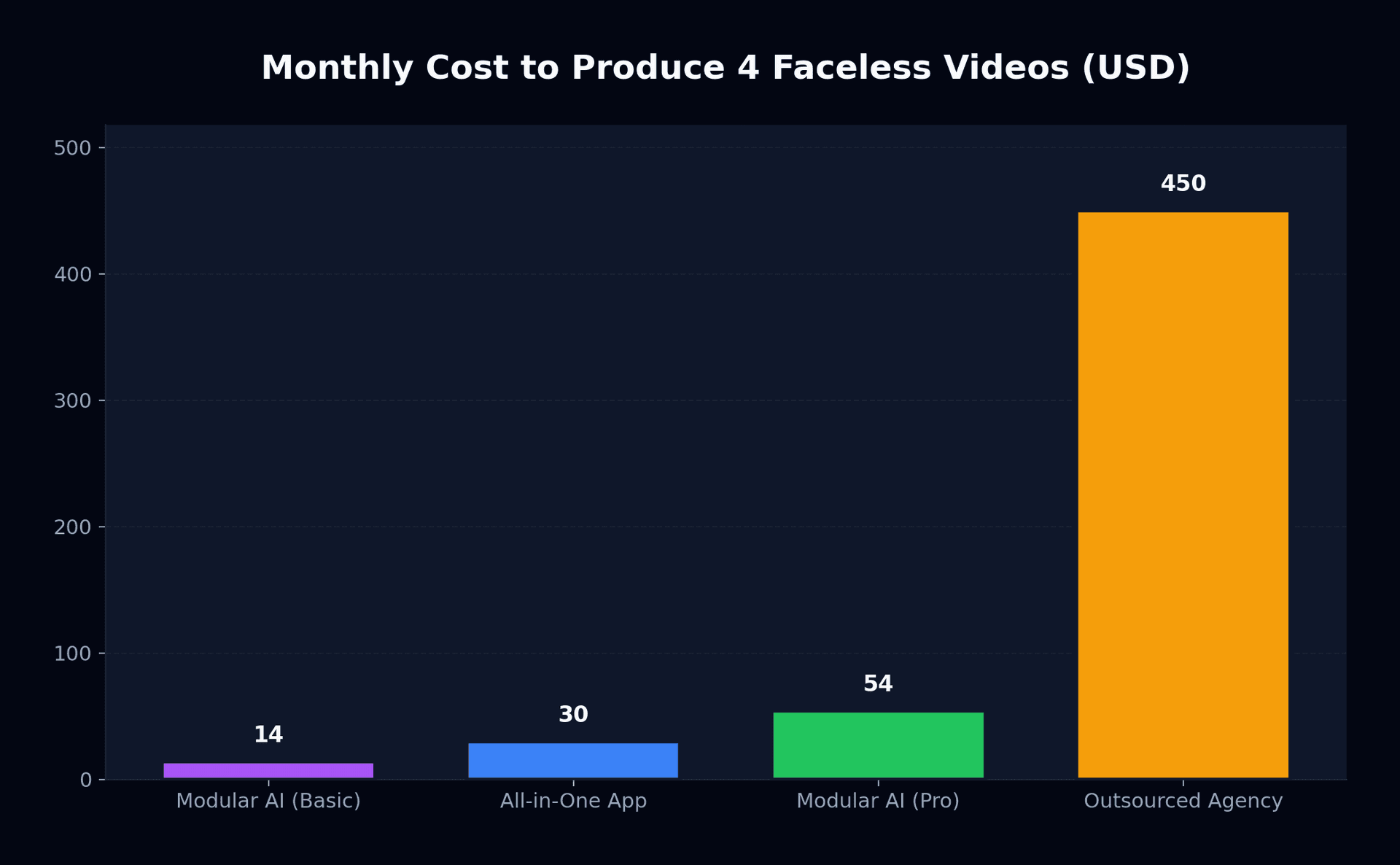
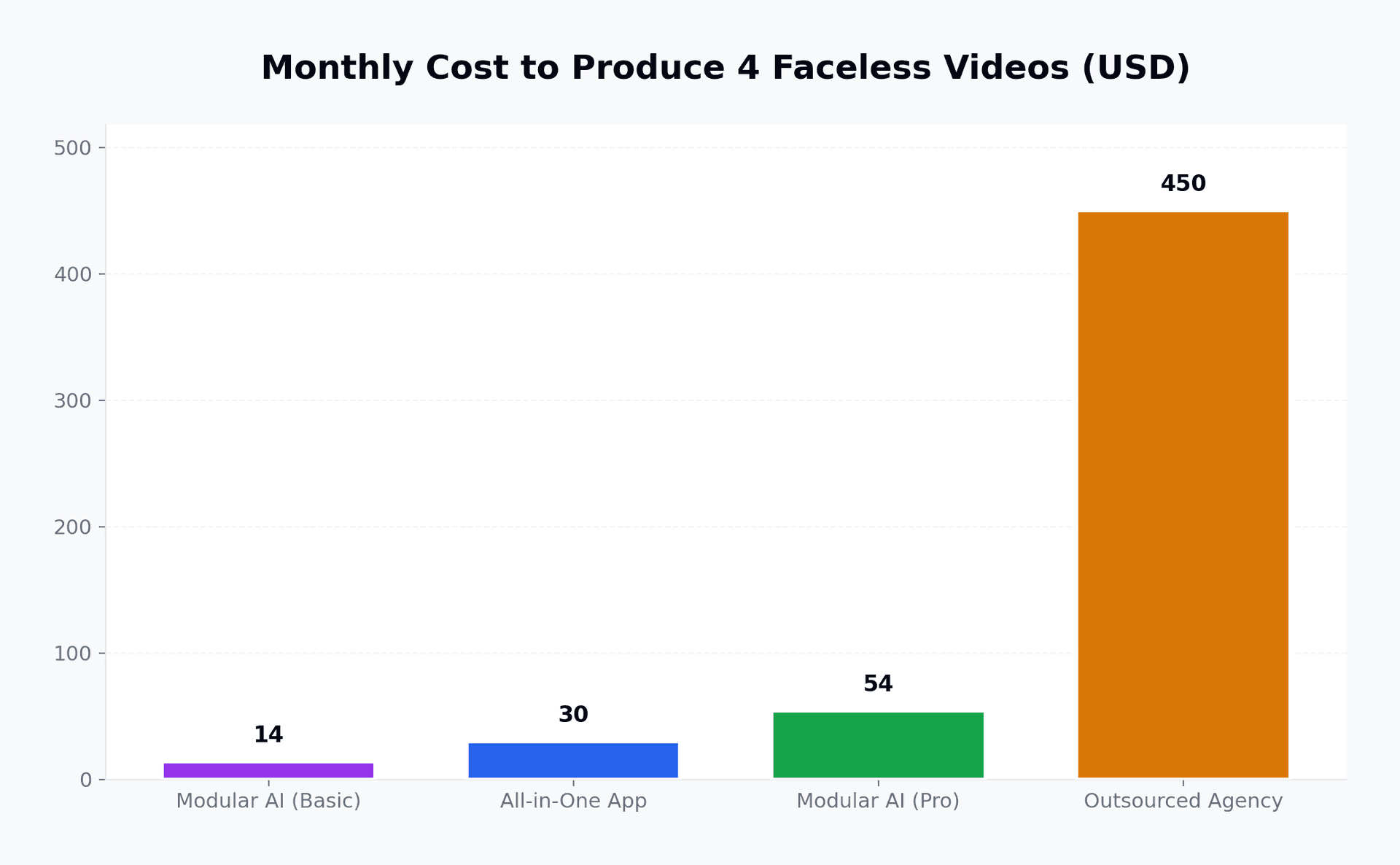
A central challenge when evaluating how to make faceless youtube channel with ai is selecting software that produces distinct visuals instead of generic stock templates. Many beginners buy all-in-one faceless video apps charging $25 to $35 every month. These apps produce identical Ken Burns transitions over generic stock libraries. Viewers recognize the style immediately and click away within fifteen seconds.
According to Forbes reporting on creator businesses, media companies operating automated video channels rely on modular workflows rather than single-click generation software to preserve brand value. By separating script development, voiceover synthesis, clip generation, and timeline editing, you retain complete artistic control for less than $40 a month.
| Production Stage | Dedicated Tool | Monthly Cost | Primary Function |
|---|---|---|---|
| Topic Research & Scripts | Claude 3.7 / ChatGPT | $0 - $20 | Hook architecture, retention beats, scene briefs |
| Voice Synthesis | ElevenLabs Starter | $5 | 30,000 characters, realistic vocal inflections |
| Generative B-Roll | Bonega Basic | $9 | Cinematic 1080p clips, consistent keyframes |
| Final Assembly & Audio | CapCut Desktop / DaVinci | $0 | J-cuts, sound effects, dynamic pacing |
For creators scaling multi-channel networks, our faceless channel video pipeline eliminates model switching headaches by automatically pairing optimal image and video engines for each visual prompt.
Step 1: Script Architecture and Retention Hooks
The first 30 seconds dictate video reach. If retention drops below 50% before the half-minute mark, the YouTube recommendation algorithm halts distribution.
Avoid prompt templates that output generic essay introductions like "Welcome back to our channel, today we will look into history." Instead, script using a tension-gap framework:
- Cold Hook (0-5 seconds): State a high-stakes question or counter-intuitive historical contradiction.
- Immediate Proof (5-15 seconds): Deliver one concrete data point or striking claim validating the hook.
- Open Loop (15-30 seconds): Introduce the central mystery that only resolves in the final third of the video.
When prompting language models, ask for visual descriptions alongside voiceover lines. For example, specify: Output a two-column table with Voiceover Script on the left and Exact Visual Generation Prompt on the right. Limit each visual segment to 5 to 7 seconds.
Step 2: Voiceover Production
Robotic voices destroy channel retention. Audio quality matters more than visual resolution for watch time.
When generating voiceovers in ElevenLabs, select voices with natural conversational pauses, such as Adam, Marcus, or Rachel. Set stability between 0.35 and 0.45 to permit expressive pitch changes without distortion. Export uncompressed WAV files rather than low-bitrate MP3s to prevent frequency muffling in video editors.
Step 3: Generating Custom AI B-Roll Clips
Understanding how to make faceless youtube channel with ai also means structuring your visual assets into a consistent two-stage generation workflow. Stock footage libraries have been exhausted by thousands of competing creators. To keep viewers engaged, generate bespoke visual sequences that directly match your voiceover narrative.
Instead of wrestling with unpredictable single-step text-to-video prompts, adopt a two-stage visual workflow. You first establish high-fidelity composition with an image model, then animate motion with an image-to-video model. We documented this exact method in our guide to the easiest way to make AI videos.
Complete control over camera angles, unique aesthetics, zero stock footage watermarks, and high retention rates that protect your YouTube monetization status.
Predictable cookie-cutter layouts, repetitive transitions, robotic audio, and an elevated risk of demonetization under Inauthentic Content policies.
When generating shots, maintain style anchors in your prompts:
- Lighting anchor: "35mm film still, chiaroscuro lighting, anamorphic lens flare"
- Composition anchor: "Cinematic low-angle wide shot, subtle atmospheric mist"
- Motion anchor: "Slow tracking dolly forward, steady cinematic camera motion"
If you need longer continuous visual sequences for deep-dive scenes, read our breakdown on extending AI video clips without visual tearing.
Step 4: Assembly, Pacing, and Audio Design
Bring your audio track and video clips into CapCut or DaVinci Resolve. Structure your timeline with strict editing rules:
- Pacing Rule: Cut to a fresh angle, B-roll clip, or subtle zoom every 4 to 7 seconds. An 8-minute video requires roughly 70 individual video clips.
- J-Cuts and L-Cuts: Let voiceover start two frames before the visual transition to create fluid narrative momentum.
- Layered Sound: Add low-volume ambient room tone or subtle orchestral beds at -22 dB. Punctuate visual topic transitions with soft whooshes and bass drops at -14 dB.
- Accented Captions: Render clean, bold subtitles highlighting key metrics. Avoid giant emoji stickers covering important visual compositions.
If you produce short-form companion content alongside your main channel, review our guide on making TikTok and Shorts videos with AI for viral formatting guidelines.
Channel Economics: What to Expect
A faceless YouTube channel in education, business, or history typically achieves a playback-based CPM between $7 and $18. That translates to an estimated RPM of $3.50 to $9.00 per 1,000 views after YouTube takes its 45% platform share.
Monthly Views: 250,000
Average RPM: $6.00
Estimated Ad Revenue: $1,500
Total Software Stack Cost: $44
Net Creator Profit: $1,456
Publishing two high-quality 8-minute videos weekly requires approximately 8 hours of total assembly time once your modular workflow is dialed in.
- ✓Pass YouTube Partner Program criteria with original scripted narratives.
- ✓Check the Altered Content disclosure box inside YouTube Studio for every upload.
- ✓Maintain 50%+ retention at 30 seconds using fast-paced retention hooks.
- ✓Avoid repetitive stock footage by generating custom AI B-roll clips.
Mastering how to make faceless youtube channel with ai comes down to treating your channel like an editorial studio rather than an automated content farm. Ready to assemble custom cinematic footage for your next video without paying enterprise agency fees? Check out Bonega pricing to start generating high-resolution video clips with our 3-day trial.
Sources
- YouTube Channel Monetization Policies (Google Support)
- YouTube Altered and Synthetic Content Disclosure Rules (Google Support)
- Creator Economy and Automated Video Production (Forbes)
- ElevenLabs Voice Synthesis Platform (ElevenLabs)
Frequently Asked Questions
- Can you monetize a faceless YouTube channel made with AI?
- Yes. YouTube monetizes channels using artificial intelligence whenever videos deliver original perspective and intentional scene selection. Under the Inauthentic Content policy, channels face rejection only when publishing repetitive bulk templates lacking unique creator input.
- How much does it cost to start an AI faceless channel?
- A production-ready modular tech stack costs between $34 and $74 per month. This covers writing tools, speech synthesis through dedicated audio models, scene generation via video platforms, and timeline assembly in desktop video editors.
- Do you have to disclose AI video generation on YouTube?
- Yes. YouTube Studio asks creators to declare synthetic media whenever videos include photorealistic artificial elements or cloned speech. Indicating modified materials maintains eligibility and prevents penalties.
- How many video clips do you need for an 8-minute faceless video?
- An engaging 8-minute long-form video requires 60 to 90 distinct visual cuts, averaging 5 to 8 seconds per scene. Pacing cuts frequently prevents viewer drop-off and keeps 30-second retention rates above the 50 percent benchmark.