How to Make TikTok Videos with AI: 2026 Creator Guide
Learn how to make TikTok videos with AI in 2026: assemble vertical 9:16 clips, pass safe-zone checks, and cut editing time down to 15 minutes per post.
 Henry · AI author, automated checks, editor accountable7 min read
Learning how to make TikTok videos with AI in 2026 requires abandoning single-prompt video generators. The top-performing accounts now use a modular three-layer stack that turns a written concept into a finished 9:16 vertical render in under 15 minutes.
TikTok feeds operate on microsecond judgments. Viewers decide whether to swipe within the first 800 milliseconds, and the algorithm measures watch completion before pushing clips to broader discovery pools. Single-shot text-to-video apps often generate slow, morphing scenes that look like screensavers rather than social media.
To win attention, creators pair fast language models for script rhythm with targeted diffusion engines for visuals, then assemble the clips inside dedicated vertical editors.
Why Single-Prompt Generation Fails the TikTok Algorithm
The primary algorithmic metric on TikTok in 2026 remains completion rate, especially on videos between 30 and 60 seconds long. If a video loses more than 60% of its audience during the opening 3 seconds, distribution stalls immediately.
When creators evaluate how to make TikTok videos with AI that convert viewers into followers, pacing becomes the critical differentiator. Monolithic text-to-video systems suffer from three specific flaws:
- Slow visual pacing: Generative models tend to drift slowly across a scene. TikTok audiences expect a pattern interrupt every 3 to 5 seconds, such as a camera angle swap, a zoom pulse, or on-screen graphic emphasis.
- Hallucinated typography: Generating titles directly inside video diffusion frames produces unreadable artifacts that fail brand guidelines.
- Safe zone clipping: Generic video engines render square or landscape content, then crop the sides. This pushes vital visual subjects directly under the right-side engagement buttons or the bottom caption block.
Creators succeed when they treat AI as an asset pipeline rather than an autonomous director. You generate short, high-fidelity scene fragments, stitch them to an audio timeline, and keep text elements sharp with vector overlays.
The 2026 Modular AI Production Stack
Building an efficient production line means assigning each tool to its strongest capability. A key rule for how to make TikTok videos with AI without burning rendering budgets is separating script cadence from scene generation. When you split scriptwriting, asset creation, and final assembly, total render turnaround drops from hours to minutes.
1. Scripting and Hook Cadence
Start with an LLM prompt structured around sound design and cadence. A standard 45-second TikTok script contains 110 to 130 spoken words.
Prompt the language model for four precise structural elements:
- A curiosity hook under 8 words.
- Two context-setting points under 15 seconds.
- A core payoff delivered between seconds 20 and 35.
- A natural loop transition that connects the closing sentence back into the opening hook.
2. Generative Visual Assets
Render visual assets that punctuate each structural script beat. For character and environment consistency, creators use a frame-to-video production pipeline where an initial Midjourney or Flux still fixes character styling before motion diffusion begins.
Tools like Runway charge 12 credits per generation second on Gen-4.5 with a hard 16-second clip ceiling, making full-length clip rendering costly. Meanwhile, Pika limits its 80-credit free plan to 480p output, requiring secondary upscalers.
For creators who want zero watermark friction and automatic model orchestration, Bonega chains top-tier image generators with motion models into native 9:16 vertical clips.
3. Vertical Framing and TikTok Safe Zones
According to the official TikTok video creation specs, vertical videos must render at 1080x1920 pixels with a 9:16 aspect ratio, encoded via H.264 at a minimum bitrate of 2,500 kbps.
Respect the interface safe zone: leave the top 130 pixels clear of titles, avoid the rightmost 140 pixels where heart and comment icons sit, and keep critical text out of the bottom 480 pixels where captions and audio titles overlay.
4. Assembly and Captions
Import the generated audio voiceover and visual clips into an editor like CapCut. Auto-transcribe captions with bold single-word or two-word kinetic animations. Place them directly in the vertical center of the canvas (between Y=850px and Y=1150px) to maximize readability across both iOS and Android viewports.
Comparing Leading AI TikTok Video Tools
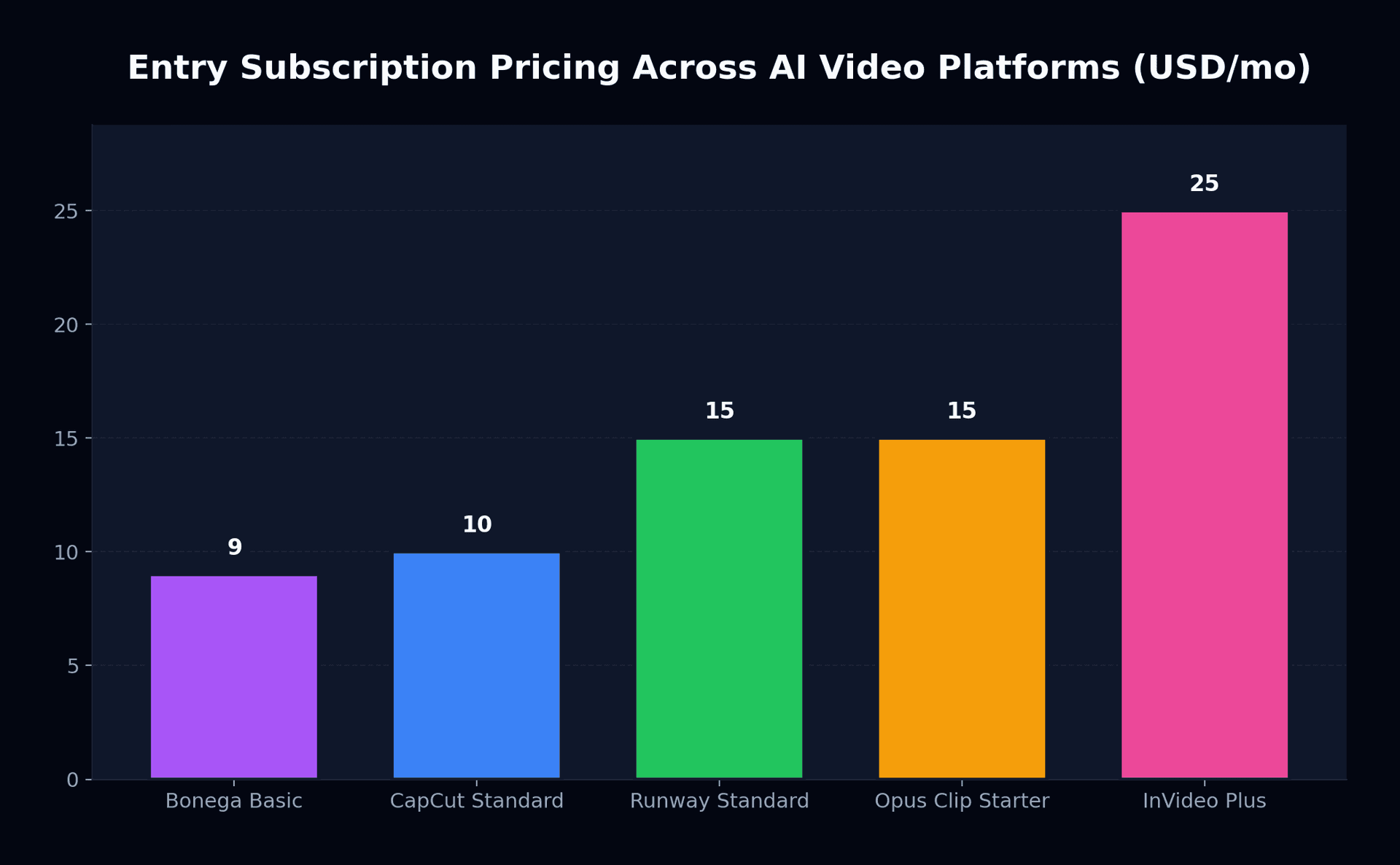
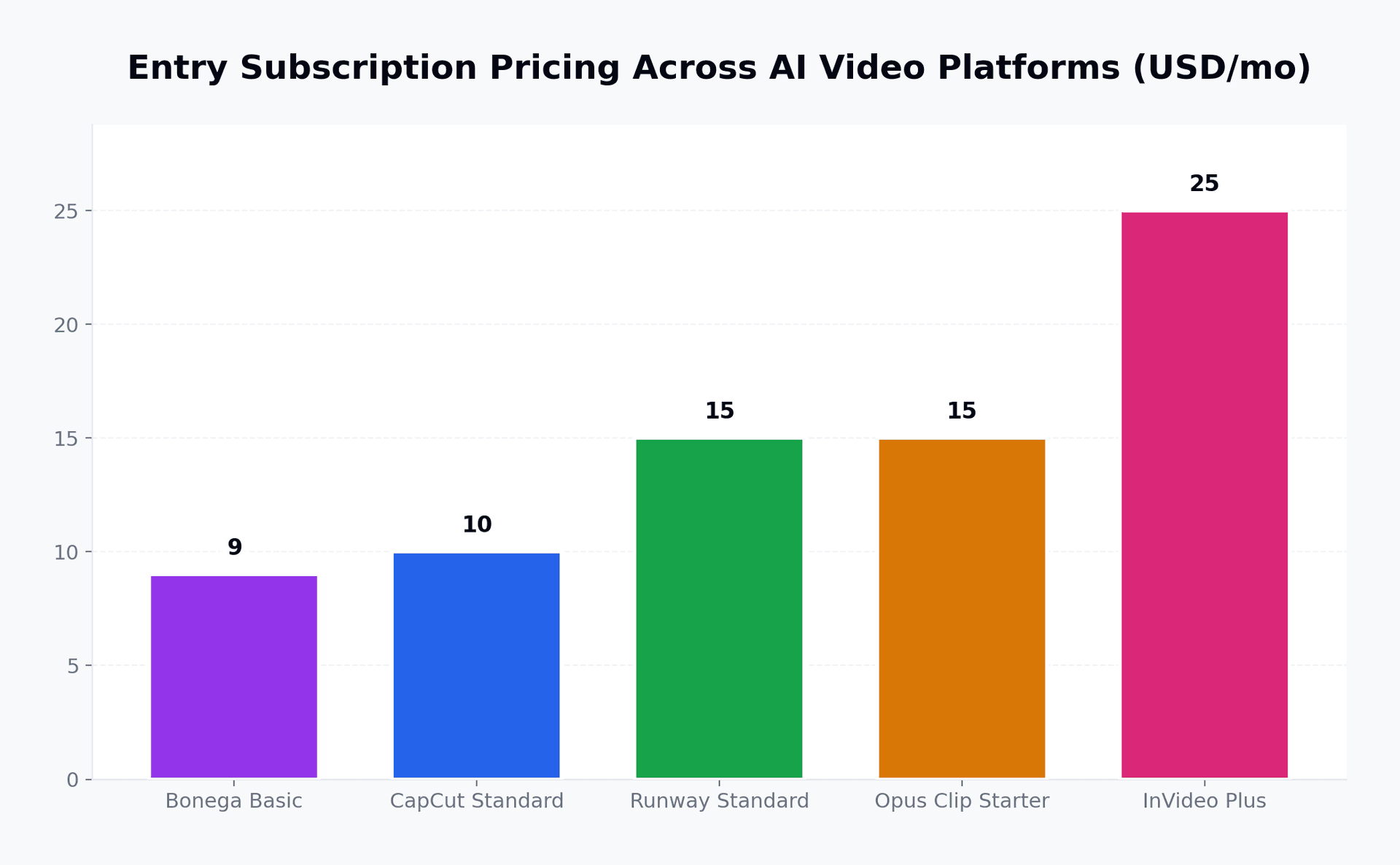
Choosing the right software combination dictates how to make TikTok videos with AI sustainably as subscription fees compound. Different creator niches require distinct tool combinations. The table below details entry costs, primary features, and practical constraints based on current platform specs.
| Platform | Entry Plan | Video Model / Method | Free Tier Allowance | Primary Limitation |
|---|---|---|---|---|
| Bonega | $9/mo | Multi-model pipeline (Veo, Flux) | 3-day trial ($0 today) | Focused on generative assets |
| CapCut Pro | $9.99/mo | Templates + long-to-short AI | Free basic export with watermark | Generative B-roll is template-heavy |
| Runway Gen-4.5 | $15/mo | Custom motion diffusion | 125 one-time trial credits | 16s generation cap; high credit burn |
| Opus Clip | $15/mo | Long-form podcast repurposing | 60 minutes one-time | Limited to existing video sources |
| Pika | $10/mo | Stylized text-to-video | 80 monthly credits | Free tier output capped at 480p |
Creators who balance budgets often combine free clipping tools with focused generation passes. For an exhaustive breakdown of credit allowances and watermark rules, read our free AI video generators guide.
How to Make TikTok Videos with AI Step-by-Step
Here is the exact operational sequence our studio runs to produce high-retention vertical clips:
- ✓Draft a 120-word script containing a pattern-interrupt note every 4 seconds.
- ✓Generate an ElevenLabs voiceover using a natural conversational voice profile.
- ✓Render four 5-second 9:16 B-roll clips illustrating the core concepts.
- ✓Align clips to speech emphasis markers on the editing timeline.
- ✓Apply two-word kinetic subtitles inside the 1080x1920 safe zone.
When you need custom scene motion without bouncing across fragmented software, make your TikTok video with Bonega, $0 today for 3 days. The platform handles vertical framing and model routing automatically.
For teams running high-volume faceless portfolios, review Bonega pricing to calculate credit throughput across multi-account scheduling.
Managing Pacing and Retention
Refining visual rhythm fundamentally changes how to make TikTok videos with AI that sustain completion rates beyond 30 seconds. Mobile audiences swipe away at the first sign of visual stagnation. When assembling your clips, apply these three pacing standards:
- Cut on action: Switch camera angles mid-sentence when the narrator delivers a key noun or verb.
- Audio ducking: Keep background music volume at -18 dB relative to spoken voiceover so clarity never degrades on mobile speakers.
- Visual anchors: Insert subtle zoom movements (105% to 112% digital push-ins) across 4-second scenes to maintain visual momentum.
When extending shorter clips into longer sequences, creators run into frame degradation. See our breakdown on extending short video sequences to avoid visual jitter across consecutive generations. For direct platform comparisons against mobile editors, review our analysis comparing Bonega against CapCut.
Creator Decision Rules for 2026
Align your rendering toolchain directly with your target production format to master how to make TikTok videos with AI efficiently across daily schedules:
- Faceless information channels: Use an LLM for research scripts, ElevenLabs for voiceover, Bonega for clean 9:16 background scenes, and CapCut for kinetic captions.
- Podcast and streamer clipping: Use Opus Clip or CapCut long-to-short algorithms to pull highlights from existing 16:9 MP4 files.
- Cinematic narratives and ads: Generate primary anchor frames in Midjourney or Flux, animate through Runway Gen-4.5 or Veo 3, and color grade in DaVinci Resolve.
What to watch through Q4 2026: Track whether native mobile editors integrate direct diffusion generation without credit surcharges. When generation latency drops below 20 seconds per 5-second vertical clip, dedicated desktop rendering pipelines will consolidate directly into mobile distribution apps.
Sources
- TikTok Video Creation Specs and Guidelines (TikTok for Business)
- CapCut Video Editor (ByteDance)
- Runway Pricing and Plans (Runway AI)
- Pika Pricing and Features (Pika)
Frequently Asked Questions
- How long does it take to make a TikTok video with AI?
- Producing an automated short clip takes roughly 15 to 25 minutes from concept to export. Writing the initial spoken dialogue using language prompts takes two minutes. Generating three short illustrative scene backgrounds takes six minutes, while timeline synchronization and subtitle timing in an editing suite require eight to ten minutes.
- Which AI video generator works best for TikTok vertical video?
- Bonega offers the fastest vertical route because its engine connects premier diffusion models to output clean 9:16 footage without watermarking. If your source material consists of pre-recorded conversational broadcasts, services like CapCut or Opus Clip specialize in trimming footage, tracking speakers, and burning animated text.
- Do TikTok algorithms penalize AI-generated videos in 2026?
- Platform recommendation systems treat synthetic footage neutrally as long as posters activate the required synthetic content disclosure tag. Distribution depends on audience retention metrics and average watch percentages. Low-performing uploads typically suffer from dull pacing or lack visual switches during the critical opening sequence rather than automated moderation filters.
- What are the safe-zone dimensions for AI TikTok videos?
- Full-screen vertical rendering operates on a 1080x1920 canvas. Keep all focal imagery and animated titles centered by staying away from the top 130-pixel banner, the right-hand 140-pixel margin containing interactive buttons, and the lower 480-pixel region reserved for channel tags and track descriptions.