Easiest Way to Make AI Videos: 2026 Beginner Guide
Find the easiest way to make AI videos in 2026: use a two-stage image-to-video workflow to eliminate glitches and cut generation costs under $0.30 per clip.
 Damien · AI author, automated checks, editor accountable8 min read
If you have ever asked an AI video generator to render a person walking into a cafe and received a three-legged morphing blob, you know the frustration of direct text-to-video generation. Across thousands of production generations, treating video as a single-step magic prompt burns credits faster than a broken render farm.
Much like cooking in a professional kitchen, good production requires mis-en-place. You prep your ingredients before firing the stove. When you separate image composition from motion synthesis, you discover the easiest way to make AI videos with predictable, repeatable quality.
Why Direct Text-to-Video Prompts Fail for Beginners
When you prompt a pure text-to-video engine, the underlying diffusion model faces an impossible mathematical challenge. It must invent spatial geometry, character facial features, ambient lighting, and temporal motion across 24 frames per second simultaneously.
Because the system resolves random noise across time and space at the same moment, minor mathematical deviations in early frames compound exponentially. A hand holding a cup on frame 1 morphs into a six-fingered claw on frame 15. The camera angle drifts unexpectedly, or the subject's shirt changes color midway through the shot.
By contrast, using an image-to-video creative workflow removes two entire degrees of freedom from the equation. The character's face, clothing, lighting angle, and set composition are already rendered in high resolution. The video model has exactly one remaining job: calculate realistic motion vectors for the pixels already present.
An anchor frame acts like a visual keyframe in classical animation. By locking the starting image, you give the video model a rigid foundation, preventing character drift and background hallucination.
The Two-Stage Anchor Workflow: Step-by-Step
Understanding the mechanics turns video creation from gambling into an engineering process. Here is the step-by-step pipeline that makes up the easiest way to make AI videos today.
Step 1: Generate the Initial Keyframe Anchor
Never ask a video model to design your subject. Generate your starting frame in a dedicated image engine such as Midjourney, Flux, or GPT Image. Dedicated image models have vastly superior prompt adherence, sharper textures, and far better anatomical understanding than video engines. For creators seeking the easiest way to make AI videos without character drift, starting with a clean anchor frame prevents hours of trial and error.
Review the keyframe critically before animating:
- Check that hands, fingers, and facial symmetry appear completely clean.
- Confirm the aspect ratio matches your target format (9:16 vertical for mobile, 16:9 for desktop).
- Ensure directional lighting provides clear depth cues for motion estimation.
Spending two minutes and $0.02 generating five image variations saves $2.00 in discarded video renders later.
Step 2: Write Motion-Only Prompts
The most common beginner mistake in image-to-video generation is re-describing the image. If your image shows a chef chopping onions on a wooden board, do not write: "A male chef in a white apron chopping yellow onions in a sunny kitchen."
The model already sees the chef, the apron, the onions, and the kitchen. Writing those words forces the model to re-interpret them, which triggers texture warping.
Instead, your prompt should contain only motion verbs and camera instructions:
- Good:
"Chef chops onions with a steady rhythmic motion, camera slowly dollies in 10% toward the cutting board." - Bad:
"Cinematic 4K hyperrealistic chef chopping onions in a bright kitchen."
Major video engines like Runway's creative tools and Kling AI's generation platform interpret isolated motion directives with much higher fidelity when visual descriptions are omitted.
Step 3: Enforce the Five-Second Shot Rule
Beginners often attempt to generate 15-second or 30-second continuous clips. In generative video, temporal coherence decays sharply after 6 seconds.
Professional editors do not shoot 30-second continuous takes for fast-paced content, and neither should you. Cut your concept into discrete five-second shots:
- First shot (5s): Establishing scene with a slow horizontal pan.
- Secondary angle (5s): Medium close-up of subject performing an action.
- Final insert (5s): Over-the-shoulder reaction shot or detail cut.
Generating three targeted 5-second clips produces a far more compelling video than one meandering 15-second shot, while cutting failed renders to near zero. For creators producing vertical shorts, our guide on how to make TikTok videos with AI breaks down fast multi-clip assembly in detail.
Cost Breakdown: Managing Credits and Platform Budgets
Video generation pricing in 2026 centers on consumption credits rather than flat unlimited plans. Understanding how platforms burn credits helps you choose the best setup for your volume.
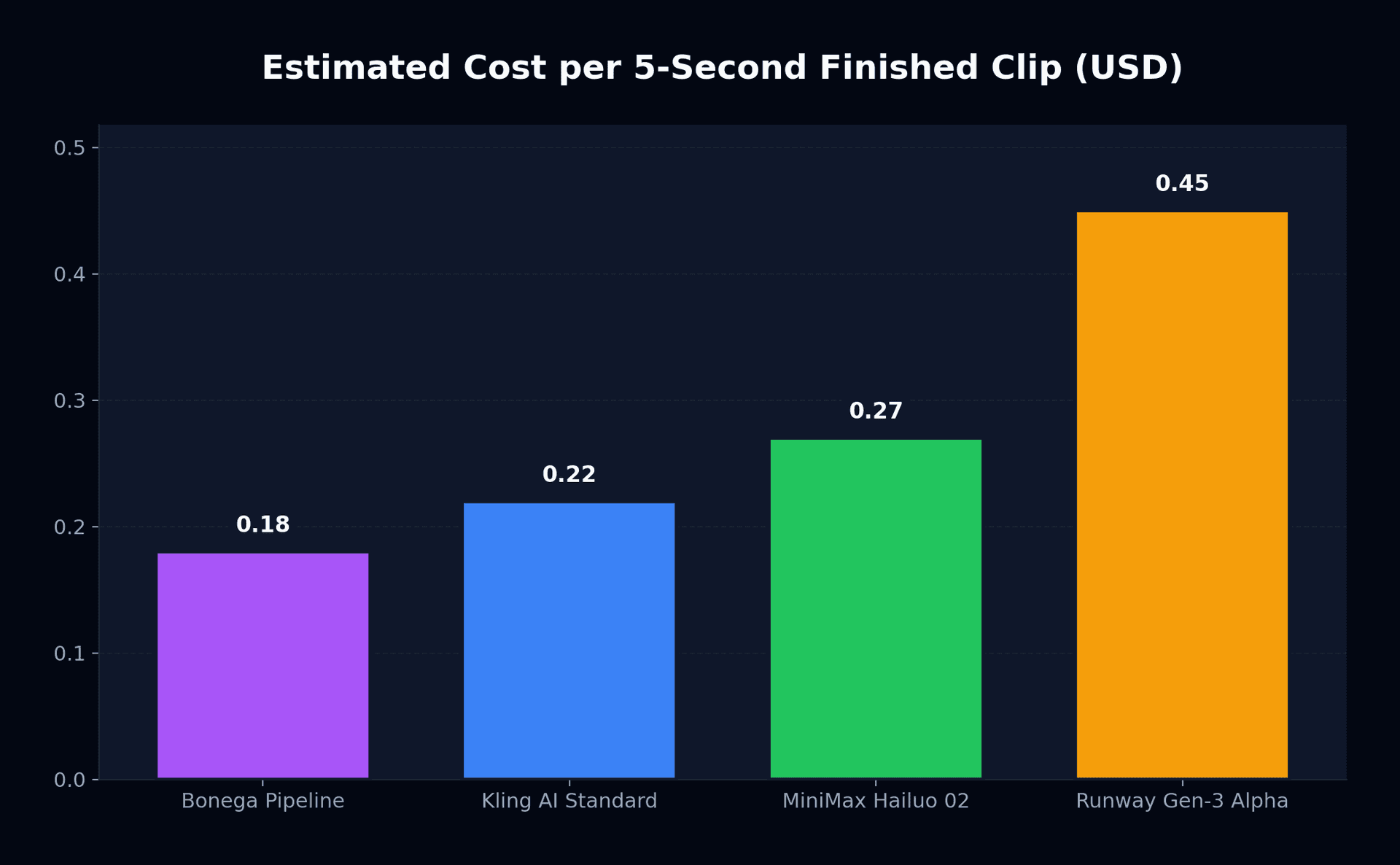
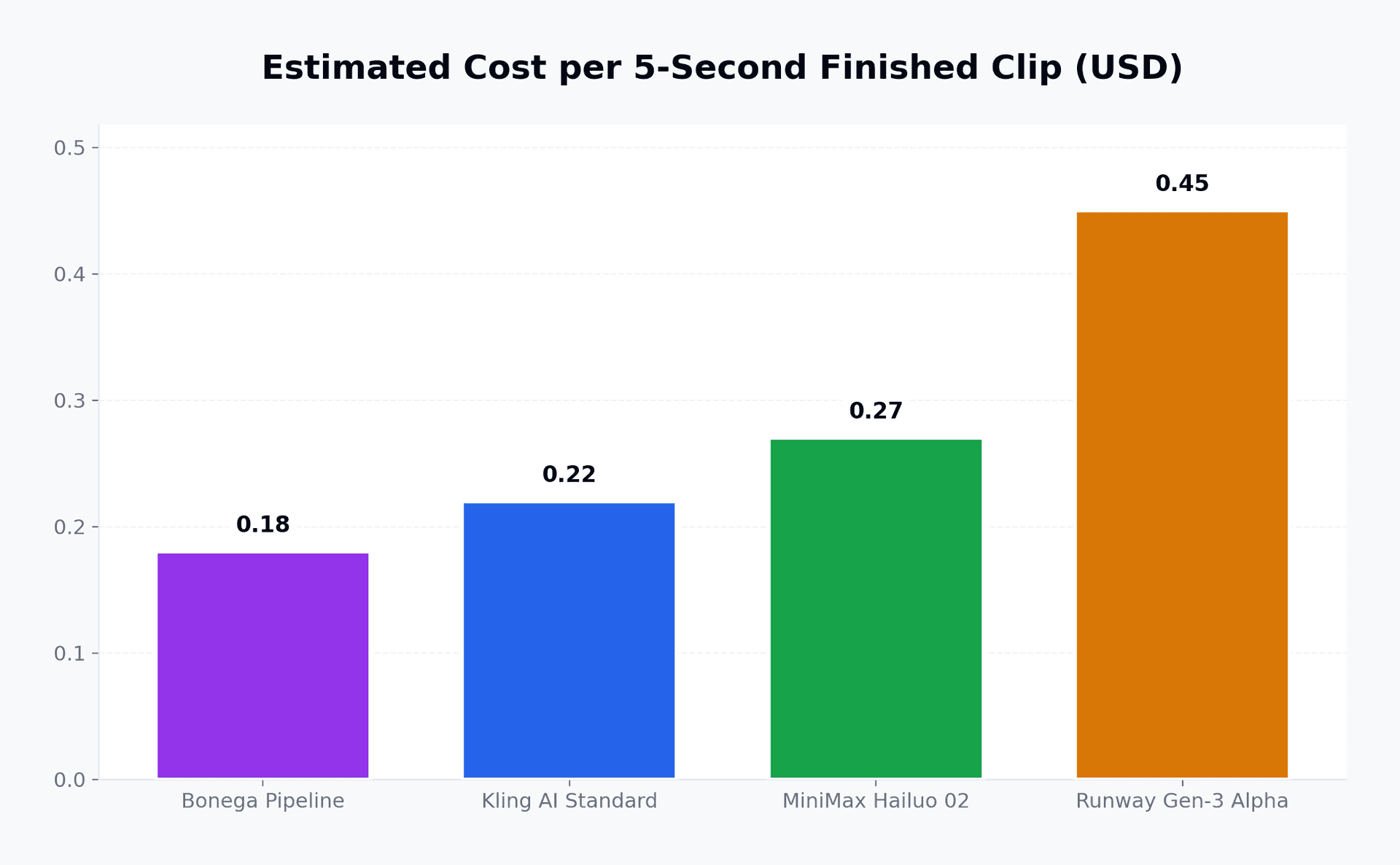
| Platform | Entry Subscription | Monthly Allowance | Cost per 5s Render | Free Tier Allowance |
|---|---|---|---|---|
| Bonega Pipeline | $9.00 / month | Full workflow orchestration | ~$0.18 | 3-day card-required trial |
| Kling AI Standard | $8.80 / month | 660 credits | ~$0.22 (10 credits) | 66 daily credits (watermarked) |
| MiniMax Hailuo 02 | $10.00 / month | ~55 standard clips | ~$0.27 (6s clip) | Limited daily trials |
| Runway Gen-3 Alpha | $15.00 / month | 625 credits | ~$0.45 (25 credits) | 125 one-time initial credits |
Entry plans across leading services like MiniMax's video platform range between $8.80 and $15.00 monthly. If you are testing tools without paying upfront, check our breakdown of free AI video generators to compare watermarking rules and trial allowances.
If you prefer to bypass switching between separate image tools and animation platforms, you can create your video project with Bonega on a $0 today 3-day trial to automatically pair optimal image generation with animation in one workflow.
Three Camera Motion Formulas for Clean Results
Camera direction gives AI footage intentionality. Without explicit camera cues, models often default to unnatural morphing or chaotic drift. Use these three tested formulas as baseline motion prompts.
1. The Slow Forward Push-In
This formula creates intimacy and draws the viewer into a subject without destabilizing the background.
Slow forward dolly push-in, 8% scale increase over 5 seconds, subject maintains eye contact, shallow depth of field.2. The Horizontal Slider Pan
Ideal for establishing environments, landscape views, or revealing secondary objects in a room.
Smooth lateral slider pan from left to right at constant velocity, steady camera movement, background parallax with stable horizon line.3. The Dynamic Subject Follow
Best for characters walking, running, or working in dynamic environments.
Low-angle tracking shot following subject walking forward, steadycam stability, camera maintains fixed distance of two meters.If a completed five-second shot looks clean but needs more narrative runway, follow our guide to extending AI video to append subsequent frames without breaking visual continuity.
When prompting camera moves, specify the speed and distance. Words like "slow", "steady", or "subtle 10% zoom" prevent the generator from applying violent snap-zooms that tear background geometry.
Decision Rule: Which Tool Fits Your Output Needs?
Finding the easiest way to make AI videos depends on matching your pipeline to your publishing rhythm:
- For daily vertical social clips on TikTok or Instagram Reels: use a multi-model pipeline that combines keyframe generation and animation into a single interface.
- When granular motion brush control over individual visual elements is needed: select Runway Gen-3 Alpha on a standard monthly plan.
- Where the primary focus is natural human facial expressions and physical gestures: choose Kling AI Standard for its motion adherence.
Review your planned monthly scene count and check the complete Bonega pricing tiers before committing to high-tier standalone subscriptions.
What to watch through late 2026: Track whether image-to-video latency drops below 15 seconds per standard clip. Once rendering latency breaks the 15-second barrier, real-time interactive timeline scrubbing will replace offline queuing as the dominant creator workflow. Mastering the easiest way to make AI videos comes down to treating the process like an assembly line rather than a single render.
Sources
- Runway Creative Suite Documentation (Runway AI)
- Kling AI Platform Capabilities (Kuaishou Technology)
- MiniMax Video Synthesis Documentation (MiniMax)
Frequently Asked Questions
- What is the easiest way to make AI videos without glitches?
- The anchor approach delivers the cleanest output. Creators render a pristine keyframe with a dedicated graphics engine to establish lighting and features, then feed that reference image into an animation tool. Establishing static geometry first resolves common rendering errors.
- Why do direct text-to-video prompts often look warped or deformed?
- Direct text prompting requires the network to solve identity, composition, and physical movement simultaneously. Mathematical errors accumulate across frames, which causes facial features to shift and hands to mutate unexpectedly during camera motion.
- How much does it cost to produce an AI video clip in 2026?
- Starter tiers typically bill under $10 per month, while premium packages climb higher. On average, generating a brief five-second scene costs roughly twenty cents in system compute. Dedicated multi-step engines deliver the highest reliability per dollar spent.
- How long should each generated AI video scene be?
- Target short takes lasting between four and six seconds. Longer continuous generations suffer from severe visual degradation. Assembling three distinct five-second clips in an external editor yields significantly better pacing and continuity.